Friday, June 22, 2007

ActiveX-like embedding of applications in OpenOffice.org?

I'm working on the problem of embedding applications in an OpenOffice docking window --- similar to the new API inside Word which allows to embed ActiveX applications in a task pane.

I just started “hacking” on the problem and I decided to try whether I can embed a Java Applet inside an OpenOffice.org docking window.

Well I “hacked” :-) the Navigator --- which is a docking window --- and reused some code from the sj module and here it is:


However there a some --- severe --- open problems:
- Focus: The framework knows nothing about XEMBED_REQUEST_FOCUS, etc
(http://standards.freedesktop.org/xembed-spec/latest/ar01s05.html)
So there is a focus problem when the applet is running in "docked" mode. (Maybe this is also the problem why the OOoBean is not working so good?)
- Need to clone the Navigator code...
- Resize problem and other events. Currently the embedded app is not notified
about resize events.
- Need to define an API to get link between embedded aps and the custom
pane.
- Some "solar mutex" problems as always :-)

Tuesday, April 24, 2007

Smart Documents.

Yesterday I started the evaluation of the Microsoft's ISmartDocument interface for Office2003.
I started in a clean VM. I installed:
* Windows XP
* Office2003 and
* DevEnv 7.1 (C#)

Then I downloaded and installed the Office 2003 Smart Document Software Development Kit (SDK)

Next I tried to compile the “SimpleSampleCS” from the SDK.

It failed.

Some research showed that I had also to install the Office 2003 Update: Redistributable Primary Interop Assemblies.

Finally I was able to compile the project.

Next I tried to activate the smart document by simply opening the “SimpleSample.doc” in Word 2003. I ran the “setpolicy.bat” script and then the “DisableManifestSecurityCheck.reg” file. Then I opened the “SimpleSample.doc” and was asked to “Download the XML expansion pack”. After answering the security question with “no” I was able to get the sample working. (Other orders of invoking the scripts lead to the failure of loading the expansion pack”. I took me quite a while to figure that out. I even installed the .NET 3.0 Runtime Environment --- but I believe that is not required.).

Finally I was able to see the following “SimpleSampleCS”:


The overall architecture of “ISmartDocument”s is based on custom schemata to which actions can be attached. Quite simple but I gives custom schemata a meaning of the end.

The question I'm interested in:
* How is this work related to alien attributes and metadata in ODF? And
* what do we have to do to provide a competitive environment in OOo and ODF?

Monday, January 08, 2007

WARNING: THIS BLOG IS TOO LONG AND TOO TECHNICAL :-)


How to improve interoperability: A case study with sections


Q: So --- OpenOffice.org Writer has section support. Microsoft Word has section support. Where's the problem?
A: In the details.

OpenOffice.org section


The OpenOffice.org sections are very similar to HTML MULTICOL resp. CSS3 module: Multi-column layout concepts where a sequence of paragraph level content like paragraphs, tables, etc. can be grouped together in a <text:section> and multiple columns can be requested for layout.

Sections in a Writer document have the following form:

WRITERDOC ::= (PARAGRAPH | TABLE | WRITERSECTION)+
WRITERSECTION::= <text:section> (PARAGRAPH | TABLE | WRITERSECTION)+ </text:section>
TABLE ::= TABLEROW+
TABLEROW ::= TABLECELL+
TABLECELL ::= (PARAGRAPH | TABLE | WRITERSECTION)+

So WRITERSECTIONs in OpenOffice.org can start and end anywhere and can be nested.

Microsoft Word sections


Microsoft Word sections are different. Conceptually every Microsoft Word document consists of at least one section. So Microsoft Word documents have the form

WORDDOC ::= WORDSECTION+
WORDSECTION ::= (PARAGRAPH | TABLE)* PARAGRAPH[ with section properties attached to it]

Please note that Microsoft Word sections are always “top-level” and that only a paragraph can trigger a new Microsoft Word section to start after the itself.

So what does this mean for conversion?


a) Every WORDOC can be mapped to a WRITERDOC [not quite true for other reasons, but lets forget about this detail :-)];
b) *NOT* every WRITERDOC can be mapped to a WORDDOC.

Consider the following WRITERDOC:

PARAGRAPH
<text:section>
PARAGRAPH
<text:section>
PARAGRAPH
PARAGRAPH
</text:section>
PARAGRAPH
</text:section>
PARAGRAPH

The above WRITERDOC can not be mapped to a WORDDOC. OpenOffice.org will change the structure on export and write a WORDDOC like

PARAGRAPH + section props
PARAGRAPH
PARAGRAPH + section props
PARAGRAPH

When importing the WORDDOC back into OpenOffice.org Writer the WRITERDOC will look like

<text:section>
PARAGRAPH
</text:section><text:section>
PARAGRAPH
</text:section><text:section>
PARAGRAPH
PARAGRAPH
</text:section><text:section>
PARAGRAPH
</text:section><text:section>
PARAGRAPH
</text:section>

So clearly the structure has changes and roundtrip is broken. You can generated an infinite number of roundtrip problems based on this.

The stuff can get even worse. Consider the following WRITERDOC:

<text:section>
PARAGRAPH
<TABLE>
...
</TABLE>
</text:section>
PARAGRAPH

In order to export this to a WORDDOC you need to add a new paragraph:

PARAGRAPH
<TABLE>
...
</TABLE>
PARAGRAPH + section break properties
PARAGRAPH

since you can only tell a PARAGRAPH to start a new section.

BUT... why are we trying to map WORDSECTIONs to WRITERSECTIONS?


I believe that its better to map between WORDSECTIONs and WRITERMASTERPAGESECTIONs.
Let me try to explain.

In OpenOffice.org Writer you have the concept of “page styles”. When rewriting the above grammar for WRITERDOCs including page styles we get

WRITERDOC ::= WRITERMASTERPAGESECTION+
WRITERMASTERPAGESECTION ::= (PARAGRAPH+master page break before | TABLE + master page break before) (PARAGRAPH | TABLE )*

which is quite similar to

WORDDOC ::= WORDSECTION+
WORDSECTION ::= (PARAGRAPH | TABLE)* PARAGRAPH[ with section properties attached to it]

right? So a “master page break before” attribute can be put to a paragraph or a table and causes the new WRITERMASTERPAGESECTION to start before the paragraph or table. Whereas a “section property “ on a paragraph causes the start of a new WORDSECTION after the paragraph in a WORDDOC. Such a WORDSECTION can start on a new page with new header/footer or be continuous and simply change the columns settings for the following content.

So my favorite idea is to allow a “master page override” property at a paragraph in a WRITERDOC and use this new property to handle WORDSECTIONS.

More concrete I would like to add the following attributes to a WRITERDOC paragraph or table style:

<define name="style-style-attlist" combine="interleave">
<optional>
<attribute name="style:master-page-override">
<ref name="styleNameRef"/>
</attribute>
<attribute name="style:master-page-break">
<choice>
<value>auto</value>
<value>column</value>
<value>page</value>
</choice>
</attribute>
</optional>
</define>

we could then use this attributes to handle WORDSECTION 100% (and discourage the use of WRITERSECTIONS for .DOC interoperability :-))

For backward compatibility also the style:master-page-name="N" attribute could be emitted in case of style:master-page-override="N" and style:master-page-break="page".

E.g. the OfficeOpenXML fragment

<w:body>
<w:p>A1</w:p>
<w:p>A2</w:p>
<w:p>A3<w:pPr><w:sectPr><w:cols w:num="3"></w:sectPr></w:pPr></w:p>
<w:p>B1</w:p>
<w:p>B2<w:pPr><w:sectPr><w:cols w:num="2"><w:type w:val="continuous" /></w:sectPr></w:pPr></w:p>
<w:p>C1</w:p>
<w:p>C2</w:p>
<w:pPr><w:sectPr><w:cols w:num="1"></w:sectPr></w:pPr>
</w:body>

could be translated to the OpenDocument fragment

<office:automatic-styles>
<style:style name="S1" style:family="paragraph" style:master-page-override="P1" style:master-page-break="page"/>
<style:style name="S2" style:family="paragraph" style:master-page-override="P2" style:master-page-break="auto"/>
<style:style name="S3" style:family="paragraph" style:master-page-override="P3" style:master-page-break="page"/>
..
<style:page-layout style:name="PL1">
<style:page-layout-properties>
<style:columns fo:column-count="3"/>
</style:page-layout-properties>
</style:page-layout>
<style:page-layout style:name="PL2">
<style:page-layout-properties>
<style:columns fo:column-count="2"/>
</style:page-layout-properties>
</style:page-layout>
<style:page-layout style:name="PL3">
<style:page-layout-properties>
<style:columns fo:column-count="1"/>
</style:page-layout-properties>
</style:page-layout>
</office:automatic-styles>
..
<office:master-styles>
<style:master-page style:name="P1" style:page-layout-name="PL1"/>
<style:master-page style:name="P2" style:page-layout-name="PL2"/>
<style:master-page style:name="P3" style:page-layout-name="PL3"/>
</office:master-styles>

..
<office:body>
<text:p text:style-name="S1">A1</text:p>
<text:p>A2</text:p>
<text:p>A3</text:p>
<text:p text:style-name="S2">B1</text:p>
<text:p>B2</text:p>
<text:p text:style-name="S3">C1</text:p>
<text:p>C2</text:p>
</office:body>

and back!

I guess this blog entry is far to long and technical by now. Maybe I should move to a WIKI in the future.

~Florian

Monday, December 11, 2006

Successfull deployment of OpenOffice in the public sector.

I had the opportunity to participate at the MAMPU conference on Successfull deployment of OpenOffice in the public sector in Kuala Lumpur, Malaysia.


It was great.

The general arguments I tried to make in my talk where around the following matrix:


The argument I derived from that matrix where

  1. clearly a shift from an open source application with a proprietary file format to an open source application with an open standardized file format improves openess.
  2. however how can a shift from a proprietary application with a proprietary file format to a proprietary application with an “open” file format improved openess? And --- is it the same kind of “openess” as in case 1)?

I then made the argument that only an open source application with an open file format can prevent a “lock-in” situation. I illustrated the fact by a case study of supporting a “minority language”.

So --- how would you fill out the matrix?

Monday, November 27, 2006

Note: This element should not be used in new documents.

I still got a lot feedback regarding the use of the word „deprecated“. So please let me explain what I had in mind when I wrote this.

In the current ODF specification there is the following note in section 6.6.11 Table Formula Field. It says:

Note: This element should not be used in new documents.

My idea was simply to add a similar note to e.g. section 8.2.6 Subtables.

So again there are already features in ODF marked as "not to use".

Thursday, November 23, 2006

Hi Mathias,

thanks so much for referring to my blog and commenting on my "ODF 1.2 suggestions".

Yes --- I really believe we can work together making OpenDocument as well as OpenOffice.org better.

Regarding “deprecation”. Deprecation does not mean removal or even making OpenOffice.org worse. Never intentend to say this. Sorry for the confusion. What I meant was e.g. in the case of “sub tables” that "deprecation" or "discourating" the use of "sub tables" just means helping e.g. blind people to better use OpenDocument and OpenOffice.org: Subtable Accessibility Issue.

Of course the feature will stay, but I think we should offer the user an alternative way to achieve the same result and help --- not only accessibility --- but also interoperability.
Luckily OpenDocument has this feature already by using “row spans”.

I hope I could also clarify Michael Brauers concerns on the the OpenDocument TC mailing list with my response.

But I think we have the same idea here. Will never again use the word "deprecation" or "discourage" again. And I will not take away any feature. Promised!


~Florian

Monday, November 20, 2006

Suggested enhancement for OpenDocument V1.2

Tables:
* introduce allowCollapse attribute for paragraphs following nested tables to encode WW and HTML-like tables.
* declare sub tables as deprecated

Numbering
* introduce text:level-text attribute to encode arbitrary number formats
* introduce text:num-follow-char to encode WW-like numbering
* introduce text:list-override to encode WW-like numbering
* declare style:list-level-properties/@text:space-before as deprecated. Effect can be achieved with paragraph indent.

Master-page styles
* add header-first and footer-first to encode WW-like page-styles
* modify master-page styles such that WW-like sections can be encoded; current CSS3.0 like text:sections are not applicable
* declare the style:next-style-name attribute of master-page declarations as deprecated.

Styles:
* allow deriving paragraph-family styles from text-family styles.

“Break chars”
* introduce a <text:page-break/> command and a <text:column-break/> command similar to the <text:line-break/> command

Fields:
* enhance field support by introducing a <text:field-start/> and a <text:field-end/> element to which metadata can be attached.

Change tracking:
* introduce change tracking for tables
* introduce change tracking on property level

Discourage the use of the following OD features for MOOX interop:
* nested frames
* current CSS3.0 like text:sections
* use fo:break-before instead of fo:break-after
* use fo:margin-* for tables

Unfortunately I think this list is not complete yet:-)

Feedback appreciated.

Wednesday, November 15, 2006

All the small things…

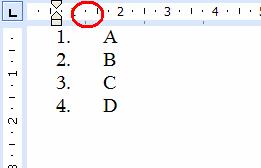
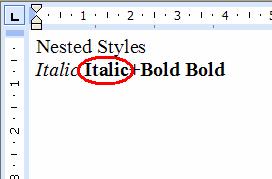
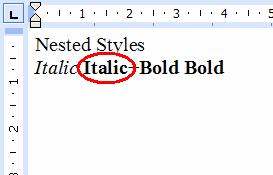
…are really important in document conversion. The table below shows three different ODF features (numbered lists, nested styles as well as nested tables) and the way OpenOffice.org Writer resp. the CleverAge ODF Converter exports these.


Original ODF in OO.oOO.o export to .DOCCleverAge ODF Converter


The above examples look rather artificial. However these kinds of small problems can tell much about the conversion quality of a filter.
For example handling nested styles correctly is a huge effort for a rather small output. Thus everybody ignores them in the first shot and aims for the more visible features. You simply file a bug and set it to “later”.
The problem is when “later” comes you realize that handling nested styles requires major changes in your existing code. You then realize that the risk of loosing all your existing features by implementing nested styles is high. So “later” becomes a synonym for “never”.

In my opinion a good test for the underlying code quality of a conversion filter is to test the nasty stuff. I believe it can tell you a lot about whether “later” means “never” or simply “not yet”.

Btw. all the above features can be mapped correctly.

Tuesday, November 14, 2006

So I started blogging. This is the first entry of my personal blog.

So there is a lot to clarify. But first let me provide some background to those who don’t know me.

I’ve done some work in the past on the .DOC, .RTF and WordML filters in OpenOffice.org. I also did some work on OpenDocument in the OpenDocument TC and the OpenDocument Metadata SC.

I also worked together with the OpenDocument Foundation on the ODF plug-in for Microsoft Office. The ODF plug-in for Microsoft Office is based on a library called OpenDocument Infoset API I was working on. Of course I’ll continue my voluntary work as a CTO of the OpenDocument Foundation and I’m eager to see how the Foundation’s work --- especially on the OpenDocument InfoSet API --- will continue. I’m happy to tell more about this in following blog entries if there is any interest.

What I discovered in all my work regarding the fileformats is that interoperability can be improved. In fact minor changes in the fileformats resp. implementing applications can improve interoperability significantly. And I hope I can prove this with my future work.

So what is this future work?

One very interesting area is OpenDocument Version 1.2. Currently the OpenDocument TC is working on the version 1.2 of OpenDocument which targets better interoperability. Very interesting and with great potential.

Another interesting area is OpenOffice.org. I really believe we can improve OpenOffice.org’s interoperability by implementing OpenDocument Version 1.2 in OpenOffice. This is a community effort for sure, so I hope I can attract people participating in this effort.

Maybe the next thing I should do is to have a little tutorial about how to contribute to the OpenOffice.org filters? Good idea?